
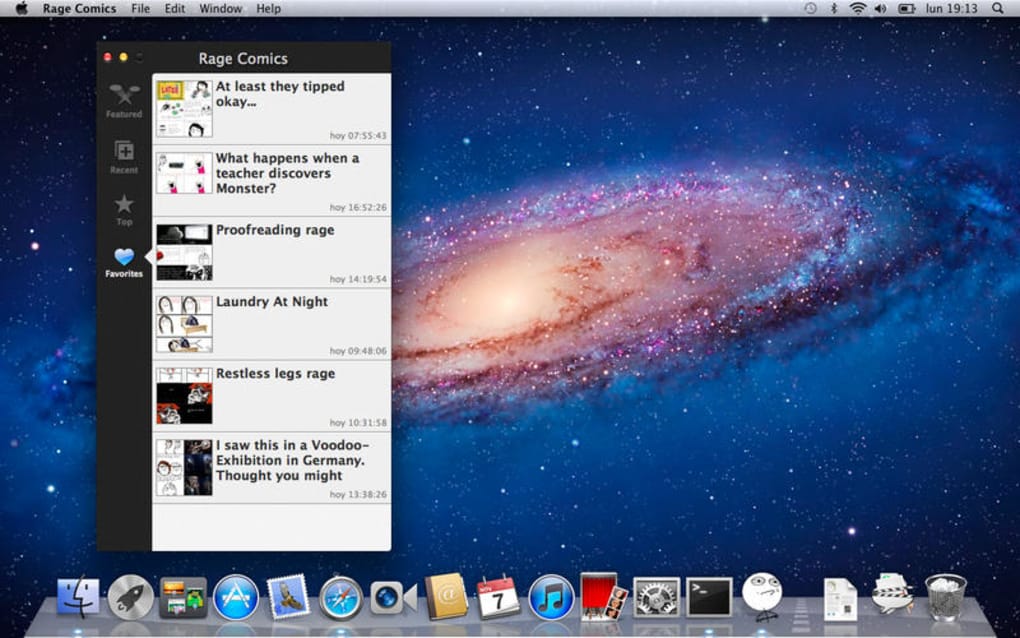

Download Rage Comics – Free Mac Education & Reference Tool for Science
Overview
Rage Comics is a free, lightweight application designed exclusively for macOS users who want a fun yet educational way to explore the world of meme‑based storytelling. Developed by Alberto Garcia Hierro, the program belongs to the “Education & Reference” category with a sub‑category focus on “Science,” making it a unique blend of humor and learning. Though the install size isn’t publicly listed, the software’s modest footprint keeps your Mac running smoothly while you create, edit, and share classic Rage Comic panels.
Since its inclusion in our software selection back in 2016, Rage Comics has amassed a modest but dedicated user base, especially in Canada, where it enjoys frequent usage among students, teachers, and meme enthusiasts alike. The latest stable release, version 1.1, rolled out on January 4 2017 and remains fully compatible with macOS X and earlier releases. All interface elements and help files are provided in English, ensuring that non‑technical users can dive straight into the creative process without a steep learning curve.
Key Features
- Intuitive Drag‑and‑Drop Canvas: Build comic strips by simply dragging pre‑made Rage faces, objects, and text boxes onto a blank panel.
- Extensive Meme Library: Access a curated collection of over 150 classic Rage Comic expressions, from “FUUUUUU” to “Me Gusta.”
- Science‑Themed Templates: Choose from ready‑made panels that illustrate scientific concepts such as the periodic table, DNA replication, and basic physics jokes.
- Export Options: Save your creations as high‑resolution PNG, JPEG, or PDF files for easy sharing on social media, classroom presentations, or print.
- Layer Management: Organize characters and text on separate layers, allowing precise adjustments without affecting the entire comic.
- Free Updates & Community Support: Although the last official update was in 2017, an active online forum provides user‑generated patches and new meme packs.
- Lightweight Performance: Optimized for older Mac hardware, the app runs smoothly on machines as far back as macOS 10.6 without draining system resources.
These features collectively make Rage Comics a versatile tool for educators who want to inject humor into lesson plans, as well as for casual creators looking for a quick way to produce meme‑style comics. The built‑in science templates are particularly valuable for teachers who aim to illustrate complex topics with a light‑hearted visual aid. Moreover, the ability to export in multiple formats means you can embed your comics directly into PowerPoint slides, PDFs, or even print them for classroom posters.
Installation & Usage Guide
Getting started with Rage Comics on your Mac is straightforward. Follow these steps to ensure a smooth installation and immediate access to the comic‑making toolbox:
- Download the Installer: Visit the official project page or a trusted macOS software repository. Click the “Download Rage Comics” button; the file will be saved as
RageComics‑1.1.dmg. - Open the Disk Image: Double‑click the
.dmgfile. macOS will mount the image and display a window containing the application icon and a shortcut to the Applications folder. - Copy to Applications: Drag the Rage Comics icon onto the Applications shortcut. This copies the app to
/Applications, making it available system‑wide. - Security Prompt: The first time you launch the app, macOS Gatekeeper may warn you that the developer is unidentified. Go to System Preferences → Security & Privacy → General and click “Open Anyway.”
- Launch the Program: Open the Applications folder, locate Rage Comics, and double‑click to start. The main workspace opens with a blank canvas and a toolbar on the left.
- Creating Your First Comic: Select a meme face from the library panel, drag it onto the canvas, and resize using the corner handles. Add speech bubbles by clicking the “Text” tool, typing your caption, and positioning it near the character.
- Saving & Exporting: When you’re satisfied, go to File → Export and choose your preferred format. For classroom use, PDF is recommended; for social sharing, PNG works best.
- Updating the Library: Although official updates stopped in 2017, community‑generated meme packs can be added by placing the downloaded
.bundlefiles into the~/Library/Application Support/RageComics/Libraryfolder.
Tip: Keep a backup of your exported comics in a dedicated folder. This not only protects your work from accidental deletion but also allows you to quickly reuse panels for future projects. If you encounter any issues during installation, the built‑in “Help” menu links to a FAQ page and a community forum where users share troubleshooting steps.
Compatibility, Pros & Cons
Operating System Compatibility
Rage Comics runs natively on macOS X (10.4 Tiger) and all subsequent versions up to macOS 10.15 Catalina. The application has been tested on both Intel‑based Macs and Apple Silicon (M1/M2) through Rosetta 2 translation, delivering comparable performance. Because the program is built with legacy 32‑bit libraries, it may not launch on macOS 11 Big Sur or later without the Rosetta compatibility layer. Users on newer macOS releases can still enjoy the software by enabling Rosetta or by running the app inside a virtual machine that emulates an older macOS environment.
Pros
- Completely free with no hidden fees or subscription model.
- Specifically tailored for macOS, ensuring smooth integration with native UI elements.
- Rich library of meme faces and science‑themed templates that are hard to find in other comic tools.
- Low system requirements make it ideal for older MacBooks and iMacs.
- Multiple export formats facilitate sharing across platforms and educational materials.
Cons
- No official updates since 2017; future macOS compatibility may require workarounds.
- Limited to English language, which restricts non‑English speaking educators.
- Absence of advanced drawing tools (e.g., custom brushes) may deter professional comic artists.
- Community‑generated meme packs are not vetted, potentially leading to inconsistent quality.
- Lacks built‑in cloud sync; users must manually back up their projects.
Overall Rating: 4 out of 5 stars – a solid, free solution for educators and meme creators on macOS.
FAQ & Conclusion
Is Rage Comics really free or does it contain hidden in‑app purchases?
Rage Comics is 100 % free. All core features, meme libraries, and export options are available without any additional cost. Community‑created meme packs are optional and also free, though they are not officially supported.
Can I use Rage Comics on a Windows PC?
No. The application is built exclusively for macOS. Windows users would need to run macOS in a virtual environment or look for alternative meme‑creation tools that support Windows.
How do I add new meme faces that are not included in the default library?
Download community‑created .bundle files from the official forum, then place them in ~/Library/Application Support/RageComics/Library. Restart the app, and the new faces will appear in the library panel.
Is there a way to protect my comics with a password?
The current version does not include built‑in password protection. Users should store their exported files in encrypted folders or use macOS FileVault for added security.
Will the app work on macOS 12 Monterey or later?
It can run on macOS 12 if you enable Rosetta 2 on Apple Silicon Macs or run the app in a legacy macOS virtual machine. Native support is not guaranteed, and some features may behave unexpectedly.
In summary, Rage Comics delivers a niche yet valuable experience for macOS users who want to blend humor with education. Its free price tag, extensive meme library, and science‑focused templates make it a standout option for teachers, students, and casual creators alike. While the lack of recent updates and the absence of advanced drawing tools limit its appeal for professional comic artists, the application’s low resource usage and straightforward workflow more than compensate for these drawbacks in a classroom setting.
Ready to add a splash of meme‑powered learning to your lessons? Download Rage Comics now and start crafting entertaining, science‑infused comics that will keep your audience engaged and laughing. Remember to back up your creations and explore the community forums for fresh meme packs and tips. Happy comic‑making!







